
Make a Visa Photo From Your Phone
Make a Visa Photo From Your Phone — सरकारी दूतावास नियमों के अनुसार फोटो बनाएं, रिजेक्शन चेक करें और 300 DPI में डाउनलोड करें।
Mobile-first visa photo workflow designed for iPhone and Android users. Snap a photo using your phone’s camera or pick an existing portrait from your photo roll. Follow our distance rules to eliminate wide-angle facial distortion and auto-crop to official embassy dimensions. [हिन्दी दिशा-निर्देश]: Make a Visa Photo From Your Phone के लिए आधिकारिक मानकों के अनुरूप फोटो फ्रेमिंग करें, चेहरे के अनुपात की पुष्टि करें और उच्च रेजोल्यूशन में सीधे डाउनलोड करें।
Make a Visa Photo From Your Phone
Transform a smartphone portrait into an embassy-compliant biometric visa photo. Follow our distance rules to eliminate wide-angle facial distortion.
Front-facing selfie cameras distort facial features (making nose look larger and ears disappear). Have someone else stand 5–6 ft away.
The phone lens must be perpendicular and at exact eye height. Tilting up or down skews the biometric chin-to-crown ratio.
Step back 6 feet and use 2× optical zoom or portrait mode (without background blur) to ensure natural, flat perspective.
Start With Your Smartphone
Directly from Safari, Chrome, or any mobile browser on iOS and Android. Zero app downloads needed.
Top 5 Consular Photo Rules • दूतावास रिजेक्शन से बचने के 5 नियम
फोटो खिंचवाते समय चश्मा उतार दें; लेंस की चमक से बायोमेट्रिक स्कैनर फेल होता है।
मुंह पूरी तरह बंद रखें, दोनों होंठ मिले होने चाहिए और चेहरा न्यूट्रल (शांत) रखें।
दीवार से 1.5 मीटर आगे खड़े हों ताकि सिर या कानों के पीछे परछाई न पड़े।
किसी दूसरे व्यक्ति से आंखों की सीध में 1.5 से 2 मीटर दूरी से फोटो खिंचवाएं।
ठुड्डी से सिर तक का हिस्सा सरकारी पैमाने के अनुसार होना अनिवार्य है।
हमारा टूल फोटो को सही पिक्सेल और 300 DPI पर एक्सपोर्ट करता है।
How to Set Up Your Phone Camera for Visa Photos
फोटो तैयार करने के आसान कदम
- •1. Never Use the Front Selfie Camera: Front-facing cameras have ultra-wide focal lengths (22–26 mm equivalent) that cause perspective distortion—making the nose appear enlarged and ears recede. Have someone else photograph you using the rear camera.
- •2. Step Back to 5–6 Feet: Stand 1.5 to 2 meters away and use 2× optical zoom or portrait mode without bokeh blur.
- •3. Eye-Level Perpendicular Alignment: Hold the phone vertically, strictly level with the subject’s eyes. Tilting up or down skews the chin-to-crown ratio.
Phone Lighting & Background Tricks
बैकग्राउंड और रोशनी के नियम
Face a large daylight window so light falls evenly across both cheeks. Avoid direct indoor flash close to the face, which causes white glare on skin and harsh shadows on the wall.
Visual Biometric Composition & Schematics
बायोमेट्रिक फ्रेमिंग गाइड व तकनीकी निरीक्षण
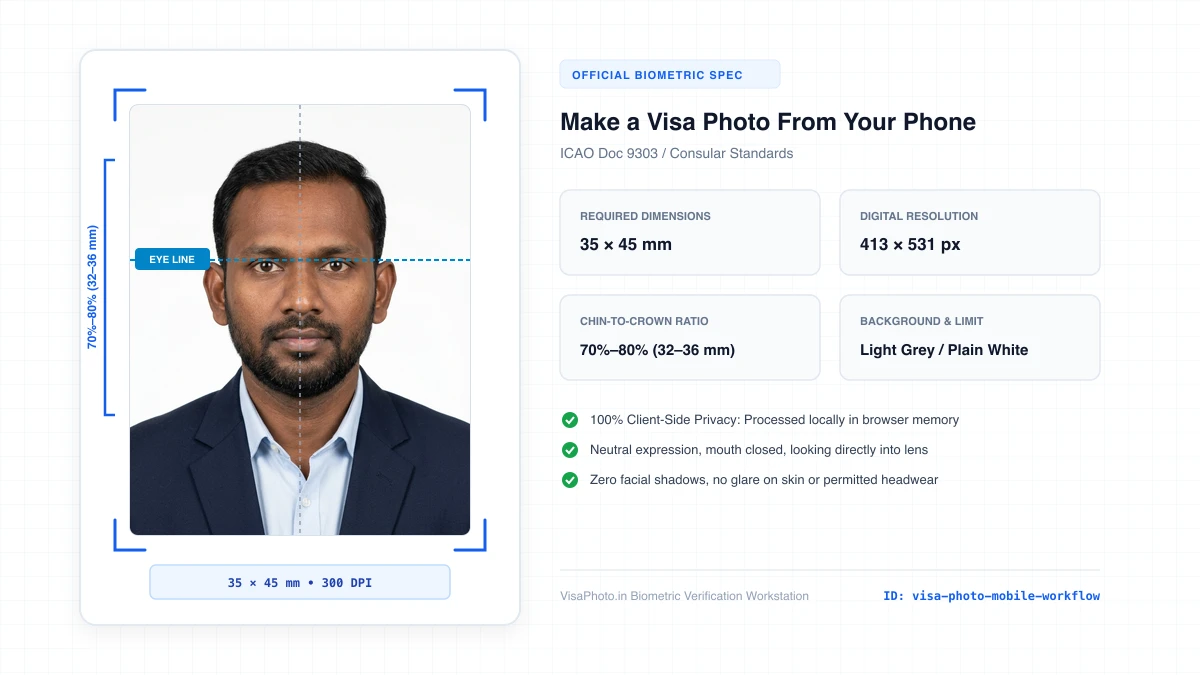
Visa Photo from Mobile workflow interface
Mobile-first visa photo capture and cropping interface
Official Government Authority Sources
All requirement specifications are sourced directly from official gazettes and immigration portals.
What Make a Visa Photo From Your Phone Can and Cannot Verify
हमारी तकनीकी गारंटी और निष्पक्ष पारदर्शिता
VisaPhoto.in maintains complete transparency. We ensure your photograph matches published mathematical and optical specifications, but we never make false claims of consular authority.
- ✓Exact Dimensions: सटीक साइज (mm, इंच) और 300 DPI रेजोल्यूशन।
- ✓Target File Limit: 240 KB या 300 KB के अंदर सुरक्षित कंप्रेशन।
- ✓Biometric Ratios: चेहरे (70%–80%) और आंखों की बिल्कुल सही सीध।
- ✓Background Uniformity: बैकग्राउंड का सही रंग (सफेद या हल्का ग्रे)।
- !Visa Approvals: वीजा अप्रूवल का अंतिम निर्णय दूतावास के हाथ में होता है।
- !Photo Recency: फोटो 6 महीने से ज्यादा पुरानी नहीं होनी चाहिए।
- !Physical Identity: फोटो में आवेदक की असली पहचान स्पष्ट होनी चाहिए।
Frequently Asked Questions
अक्सर पूछे जाने वाले सवाल व आधिकारिक जवाब
Related Biometric Tools & Compliance Guides
अन्य उपयोगी वीजा टूल्स व देश गाइड