Visa Photo Shadow Checker
Visa Photo Shadow Checker — सरकारी दूतावास नियमों के अनुसार फोटो बनाएं, रिजेक्शन चेक करें और 300 DPI में डाउनलोड करें।
Diagnostic tool and guide for detecting background and facial shadows in visa photos. Shadows on the background or uneven lighting across the cheeks are among the leading causes of biometric photo rejection. Scan your photo and learn how to fix lighting at home. [हिन्दी दिशा-निर्देश]: वीजा फोटो में रोशनी और परछाई के नियम — दीवार से 1 से 1.5 मीटर आगे खड़े हों ताकि सिर या कानों के पीछे परछाई न बने।
Visa Photo Shadow & Lighting Checker
Detect harsh background shadows, side-lighting face shadows, and uneven illumination that cause passport portal rejection.
Even daylight on both sides of face, pure clean background.
Dark silhouette cast behind subject. Stand 2–3 ft further forward.
Strong side light leaving one cheek in darkness. Turn to face light.
Ceiling light causing dark shadows under nose, eyes, and chin.
Upload Portrait to Scan for Shadows
Instant check for background shadows, uneven lighting, and facial hotspots.
Top 5 Consular Photo Rules • दूतावास रिजेक्शन से बचने के 5 नियम
फोटो खिंचवाते समय चश्मा उतार दें; लेंस की चमक से बायोमेट्रिक स्कैनर फेल होता है।
मुंह पूरी तरह बंद रखें, दोनों होंठ मिले होने चाहिए और चेहरा न्यूट्रल (शांत) रखें।
दीवार से 1.5 मीटर आगे खड़े हों ताकि सिर या कानों के पीछे परछाई न पड़े।
किसी दूसरे व्यक्ति से आंखों की सीध में 1.5 से 2 मीटर दूरी से फोटो खिंचवाएं।
ठुड्डी से सिर तक का हिस्सा सरकारी पैमाने के अनुसार होना अनिवार्य है।
हमारा टूल फोटो को सही पिक्सेल और 300 DPI पर एक्सपोर्ट करता है।
Techniques for Eliminating Harsh Under-Chin and Nasal Shadows
बैकग्राउंड और रोशनी के नियम
Overhead ceiling bulbs cast deep, dark shadows underneath the chin and across the upper lip, distorting the facial contour and triggering immediate biometric intake rejection. To eliminate under-chin shadows, position a secondary fill light at chest height or have the applicant hold a piece of white poster board horizontally at chest level just below the bottom frame line to reflect soft light back onto the neck.
Bilateral Illumination for Equal Ear and Cheek Exposure
जरूरी दिशा-निर्देश व जानकारी
Biometric scanning software measures cranial symmetry by comparing pixel brightness across both cheeks and earlobes. Unilateral window lighting that illuminates one cheek while casting the other in shadow corrupts this facial calculation. Position yourself directly facing the light source or use two balanced lamps positioned at 45-degree angles.
The 3 Major Shadow Rejection Types
रिजेक्शन की आम गलतियां व समाधान
- •1. Background Wall Shadows: Dark silhouettes cast behind the subject when standing too close to the wall.
- •2. Facial Side Shadows: Uneven illumination caused by single window or lamp light leaving half the face dark.
- •3. Overhead Shadows: Harsh downward shadows cast by ceiling lights under the eyes, nose, and chin.
How to Eliminate Shadows at Home
फोटो तैयार करने के आसान कदम
Step forward 2 to 3 feet from the wall to allow ambient light to illuminate the space behind your head. Face a natural window directly so both sides of your face receive equal illumination.
Techniques for Eliminating Harsh Backdrop & Neck Shadows
बैकग्राउंड और रोशनी के नियम
Harsh shadows behind the head or underneath the chin are among the top causes of consular photo rejections. Prevent them by increasing the distance between the subject and the backdrop wall, and using a front fill-light or white reflector board held at chest level.
Visual Biometric Composition & Schematics
बायोमेट्रिक फ्रेमिंग गाइड व तकनीकी निरीक्षण
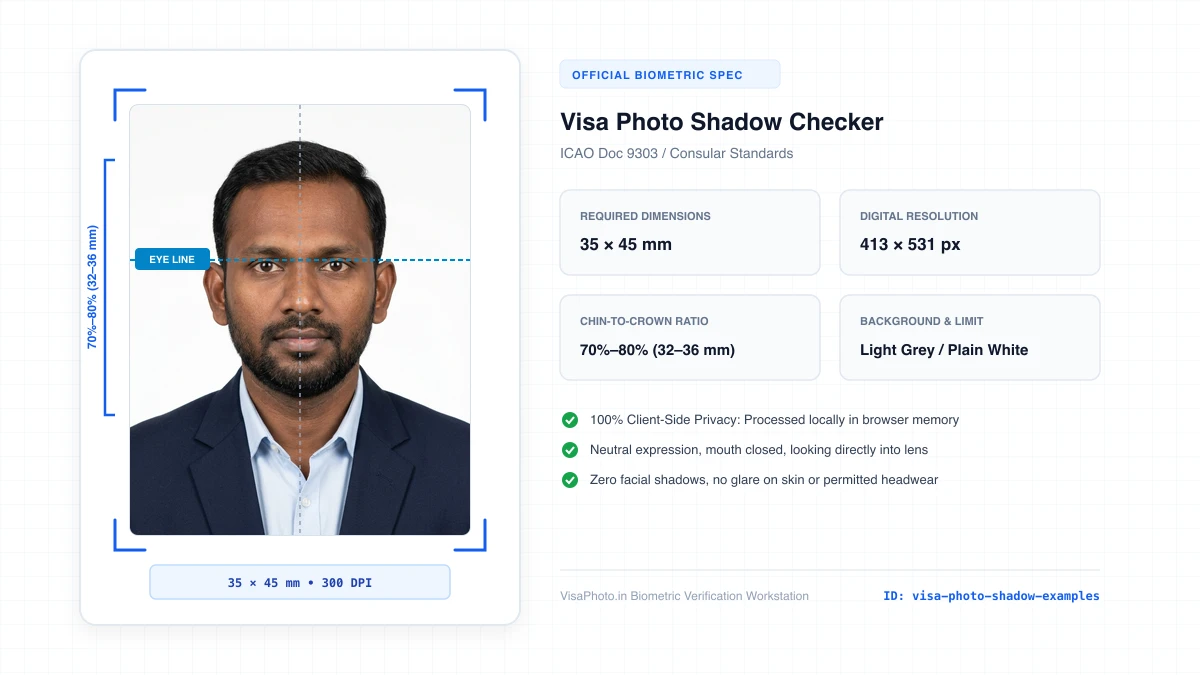
Visa Photo Shadow and Lighting comparison
Comparison of compliant lighting vs background and face shadows
Official Government Authority Sources
All requirement specifications are sourced directly from official gazettes and immigration portals.
What Visa Photo Shadow Checker Can and Cannot Verify
हमारी तकनीकी गारंटी और निष्पक्ष पारदर्शिता
VisaPhoto.in maintains complete transparency. We ensure your photograph matches published mathematical and optical specifications, but we never make false claims of consular authority.
- ✓Exact Dimensions: सटीक साइज (mm, इंच) और 300 DPI रेजोल्यूशन।
- ✓Target File Limit: 240 KB या 300 KB के अंदर सुरक्षित कंप्रेशन।
- ✓Biometric Ratios: चेहरे (70%–80%) और आंखों की बिल्कुल सही सीध।
- ✓Background Uniformity: बैकग्राउंड का सही रंग (सफेद या हल्का ग्रे)।
- !Visa Approvals: वीजा अप्रूवल का अंतिम निर्णय दूतावास के हाथ में होता है।
- !Photo Recency: फोटो 6 महीने से ज्यादा पुरानी नहीं होनी चाहिए।
- !Physical Identity: फोटो में आवेदक की असली पहचान स्पष्ट होनी चाहिए।
Frequently Asked Questions
अक्सर पूछे जाने वाले सवाल व आधिकारिक जवाब
Related Biometric Tools & Compliance Guides
अन्य उपयोगी वीजा टूल्स व देश गाइड