
How to Print a Visa Photo (Home & Studio Guide)
4×6 इंच फोटो पेपर या A4 शीट पर कई पासपोर्ट साइज फोटो एक साथ प्रिंट करने के लिए ग्रिड बनाएं।
Step-by-step instructional guide on printing visa and passport photos at home or at a retail photo kiosk. Learn the exact printer scaling settings (100% actual size), photographic paper weights (200–260 GSM), and trimming techniques needed to produce embassy-compliant physical prints. [हिन्दी दिशा-निर्देश]: How to Print a Visa Photo (Home & Studio Guide) के लिए उच्च-गुणवत्ता वाली प्रिंटेबल फोटो शीट तैयार करें और 100% स्केल पर बिना किसी विकृति के प्रिंट निकालें।
How to Print a Visa Photo at Home or at a Photo Lab
Step-by-step printing instructions: printer settings, 100% scale, paper types, and cutting.
Step 1: Choose the Right Photographic Paper
Embassies reject photos printed on ordinary office paper or lightweight cardstock. Matte or semi-gloss finishes resist fingerprints during consular handling.
Use premium photo paper designed for inkjet or dye-sublimation photo printers.
Never use plain copy paper or textured artistic paper.
Ready to Create or Check Your Photo?
Apply these guidelines immediately using our automated client-side processing tool.
Top 5 Consular Photo Rules • दूतावास रिजेक्शन से बचने के 5 नियम
फोटो खिंचवाते समय चश्मा उतार दें; लेंस की चमक से बायोमेट्रिक स्कैनर फेल होता है।
मुंह पूरी तरह बंद रखें, दोनों होंठ मिले होने चाहिए और चेहरा न्यूट्रल (शांत) रखें।
दीवार से 1.5 मीटर आगे खड़े हों ताकि सिर या कानों के पीछे परछाई न पड़े।
किसी दूसरे व्यक्ति से आंखों की सीध में 1.5 से 2 मीटर दूरी से फोटो खिंचवाएं।
ठुड्डी से सिर तक का हिस्सा सरकारी पैमाने के अनुसार होना अनिवार्य है।
हमारा टूल फोटो को सही पिक्सेल और 300 DPI पर एक्सपोर्ट करता है।
The Golden Rule: Print at 100% Actual Size
जरूरी दिशा-निर्देश व जानकारी
In your operating system or printer dialog, ensure the scaling option is set strictly to "100%" or "Actual Size". Never select "Fit to Printable Area", "Scale to Fit", or "Borderless Auto-Expand". These auto-fit options will subtly shrink or enlarge your photos by 3% to 8%, making a 51 mm photo measure 48 mm or 54 mm, which leads to immediate rejection by consular intake staff.
Choosing the Right Photographic Paper
जरूरी दिशा-निर्देश व जानकारी
Embassies universally reject photos printed on ordinary office paper. Use dedicated inkjet or dye-sublimation photographic paper with a weight of at least 200 GSM (preferably 240–260 GSM). A semi-matte (luster) or glossy finish is recommended because it reproduces crisp biometric skin tones and resists finger smudges.
Precision Cutting Techniques
जरूरी दिशा-निर्देश व जानकारी
Do not use blunt household kitchen scissors. Use a stainless steel ruler, cutting mat, and a sharp utility hobby knife (X-Acto) or a dedicated photo punch trimmer. Cut along the dashed guide lines to produce clean, sharp 90-degree corners.
Paper Stock Selection and Color Calibration for Physical Prints
जरूरी दिशा-निर्देश व जानकारी
Print your photos exclusively on heavy continuous-tone photographic paper (minimum 180 gsm) with a glossy or semi-matte finish. Avoid plain bond copy paper or standard inkjet printing, which absorbs ink and produces blurred biometric edges.
Visual Biometric Composition & Schematics
बायोमेट्रिक फ्रेमिंग गाइड व तकनीकी निरीक्षण
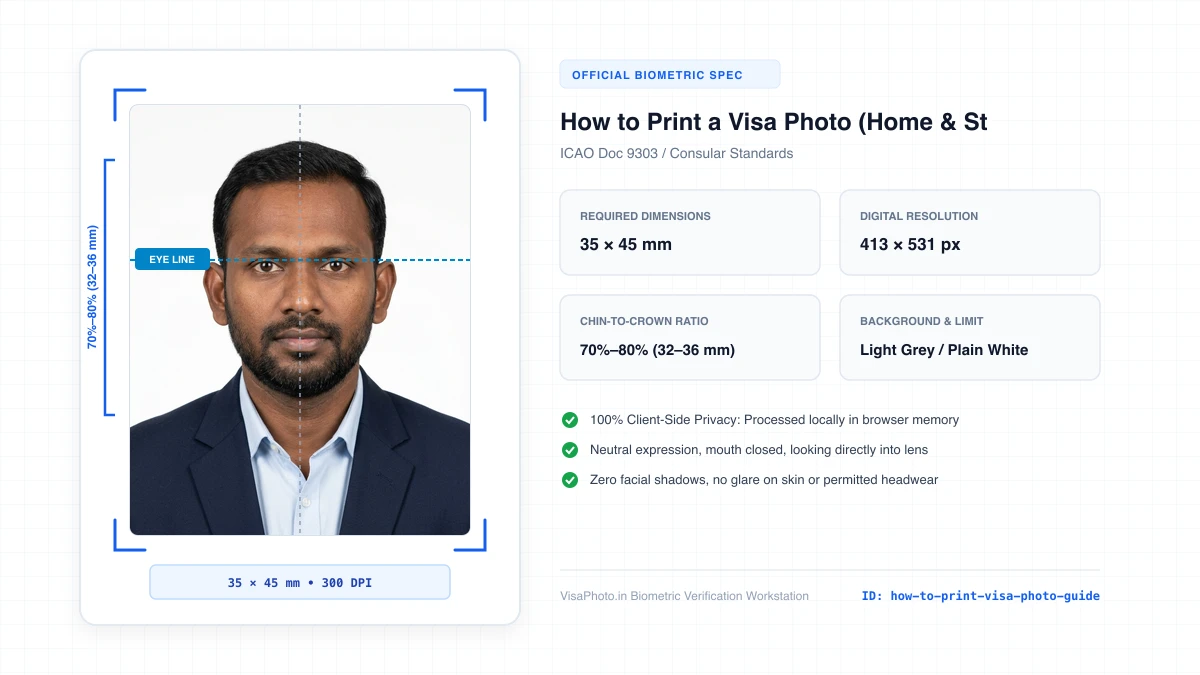
How to Print and Cut Visa Photos Guide
Visual demonstration of printer settings and trimming with a ruler
Official Government Authority Sources
All requirement specifications are sourced directly from official gazettes and immigration portals.
What How to Print a Visa Photo (Home & Studio Guide) Can and Cannot Verify
हमारी तकनीकी गारंटी और निष्पक्ष पारदर्शिता
VisaPhoto.in maintains complete transparency. We ensure your photograph matches published mathematical and optical specifications, but we never make false claims of consular authority.
- ✓Exact Dimensions: सटीक साइज (mm, इंच) और 300 DPI रेजोल्यूशन।
- ✓Target File Limit: 240 KB या 300 KB के अंदर सुरक्षित कंप्रेशन।
- ✓Biometric Ratios: चेहरे (70%–80%) और आंखों की बिल्कुल सही सीध।
- ✓Background Uniformity: बैकग्राउंड का सही रंग (सफेद या हल्का ग्रे)।
- !Visa Approvals: वीजा अप्रूवल का अंतिम निर्णय दूतावास के हाथ में होता है।
- !Photo Recency: फोटो 6 महीने से ज्यादा पुरानी नहीं होनी चाहिए।
- !Physical Identity: फोटो में आवेदक की असली पहचान स्पष्ट होनी चाहिए।
Frequently Asked Questions
अक्सर पूछे जाने वाले सवाल व आधिकारिक जवाब
Related Biometric Tools & Compliance Guides
अन्य उपयोगी वीजा टूल्स व देश गाइड