
Visa Photo A4 Print Sheet Maker
4×6 इंच फोटो पेपर या A4 शीट पर कई पासपोर्ट साइज फोटो एक साथ प्रिंट करने के लिए ग्रिड बनाएं।
Format multiple visa photographs onto standard A4 document paper (210 × 297 mm) at 300 DPI (2480 × 3508 pixels). Perfect for family visa applications, group submissions, or bulk passport photos with dashed scissor guidelines. [हिन्दी दिशा-निर्देश]: Visa Photo A4 Print Sheet Maker के लिए उच्च-गुणवत्ता वाली प्रिंटेबल फोटो शीट तैयार करें और 100% स्केल पर बिना किसी विकृति के प्रिंट निकालें।
Visa Photo A4 Print Sheet Maker
Generate an A4 sheet containing up to 24 passport photos with dashed scissor guidelines for high-volume family or group submissions.
Upload Photo to Generate A4 Sheet
We will arrange 12 copies of your 35×45 mm (Schengen / UK / Canada / Australia) photo across a full 300 DPI A4 page.
Top 5 Consular Photo Rules • दूतावास रिजेक्शन से बचने के 5 नियम
फोटो खिंचवाते समय चश्मा उतार दें; लेंस की चमक से बायोमेट्रिक स्कैनर फेल होता है।
मुंह पूरी तरह बंद रखें, दोनों होंठ मिले होने चाहिए और चेहरा न्यूट्रल (शांत) रखें।
दीवार से 1.5 मीटर आगे खड़े हों ताकि सिर या कानों के पीछे परछाई न पड़े।
किसी दूसरे व्यक्ति से आंखों की सीध में 1.5 से 2 मीटर दूरी से फोटो खिंचवाएं।
ठुड्डी से सिर तक का हिस्सा सरकारी पैमाने के अनुसार होना अनिवार्य है।
हमारा टूल फोटो को सही पिक्सेल और 300 DPI पर एक्सपोर्ट करता है।
A4 Photo Paper Calibration & Margin Setup Guidelines
सरकारी दूतावास के नियम व मानक
Standard A4 photographic paper measures 210 x 297 mm (8.27 x 11.69 inches). When printing multiple passport or visa photos on an A4 sheet, maintain a minimum outer margin of 10 mm (0.4 inches) around the page boundaries to prevent printer feed rollers from cutting off edge borders. Always select "Actual Size / 100% Scaling" in your printer preferences to prevent the driver from shrinking your photos.
Precision Trimming Guidelines on Large Multi-Photo Sheets
सरकारी दूतावास के नियम व मानक
Our A4 grid layout includes subtle crosshair cutting guides between individual photos. For professional consular results, place the printed A4 sheet on a flat cutting mat and use a stainless steel metal ruler with a sharp rotary cutter or craft hobby knife rather than household scissors, ensuring perfectly straight, unbent photograph borders.
A4 Grid Capacity & Spacing
जरूरी दिशा-निर्देश व जानकारी
- •35 × 45 mm Photos (Schengen, UK, Canada): Fits up to 24 photos arranged in a 4-column by 6-row grid.
- •51 × 51 mm Photos (2×2 in - US, India): Fits up to 12 photos arranged in a 3-column by 4-row grid.
- •33 × 48 mm Photos (China Visa): Fits up to 20 photos arranged in a 4-column by 5-row grid.
Printing on A4: Key Settings
जरूरी दिशा-निर्देश व जानकारी
Set printer media to "Photo Paper" and print quality to "High / Best". Set scaling to "100%" or "Actual Size". Ensure your printer margins do not clip the outer cutting lines.
A4 Digital Export Resolution & Print Calibration
जरूरी दिशा-निर्देश व जानकारी
Our A4 printable photo sheets are exported at a pristine 300 DPI resolution (2480 x 3508 pixels) to ensure razor-sharp facial details, accurate skin tones, and pristine cutting guidelines on any commercial photo printer or color lab equipment.
Preventing A4 Borderless Scale Distortion
जरूरी दिशा-निर्देश व जानकारी
Most commercial desktop printers feature an automated borderless printing mode that artificially stretches documents by 3% to 5% to bleed ink over paper edges. When printing visa photos on A4 paper, always disable borderless expansion and choose 100% actual size to preserve exact statutory millimeter measurements.
Visual Biometric Composition & Schematics
बायोमेट्रिक फ्रेमिंग गाइड व तकनीकी निरीक्षण
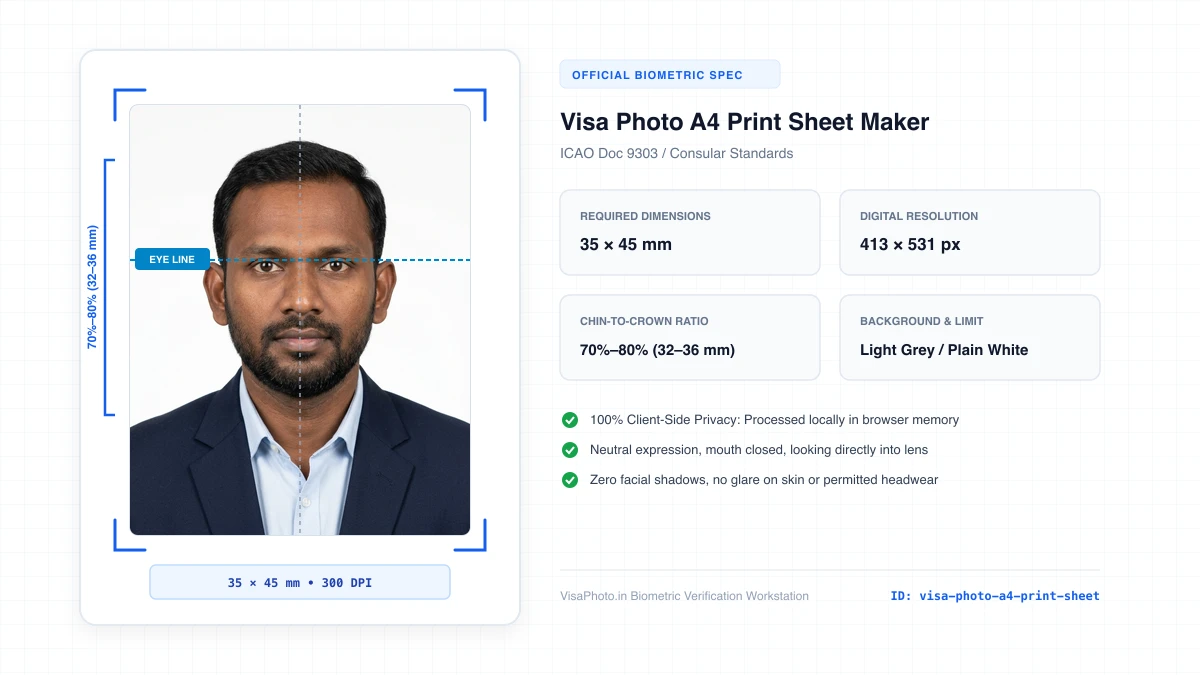
Visa Photo A4 Print Sheet layout
A4 print sheet preview showing multi-photo layout
Official Government Authority Sources
All requirement specifications are sourced directly from official gazettes and immigration portals.
What Visa Photo A4 Print Sheet Maker Can and Cannot Verify
हमारी तकनीकी गारंटी और निष्पक्ष पारदर्शिता
VisaPhoto.in maintains complete transparency. We ensure your photograph matches published mathematical and optical specifications, but we never make false claims of consular authority.
- ✓Exact Dimensions: सटीक साइज (mm, इंच) और 300 DPI रेजोल्यूशन।
- ✓Target File Limit: 240 KB या 300 KB के अंदर सुरक्षित कंप्रेशन।
- ✓Biometric Ratios: चेहरे (70%–80%) और आंखों की बिल्कुल सही सीध।
- ✓Background Uniformity: बैकग्राउंड का सही रंग (सफेद या हल्का ग्रे)।
- !Visa Approvals: वीजा अप्रूवल का अंतिम निर्णय दूतावास के हाथ में होता है।
- !Photo Recency: फोटो 6 महीने से ज्यादा पुरानी नहीं होनी चाहिए।
- !Physical Identity: फोटो में आवेदक की असली पहचान स्पष्ट होनी चाहिए।
Frequently Asked Questions
अक्सर पूछे जाने वाले सवाल व आधिकारिक जवाब
Related Biometric Tools & Compliance Guides
अन्य उपयोगी वीजा टूल्स व देश गाइड