
Prepare your visa photo for printing.
4×6 इंच फोटो पेपर या A4 शीट पर कई पासपोर्ट साइज फोटो एक साथ प्रिंट करने के लिए ग्रिड बनाएं।
Prepare your digital visa portrait for physical paper printing. Format multiple passport photos onto standard 4x6 inch (10x15 cm) or A4 photographic paper with high-contrast cutting guides at exact 300 DPI calibration. [हिन्दी दिशा-निर्देश]: 4x6 इंच फोटो पेपर पर प्रिंट करने के लिए आधिकारिक लेआउट तैयार करें।
Visa Photo Physical Print Preparation
Format multiple identical photos on standard photographic paper with razor-sharp 300 DPI alignment and cutting marks.
Upload your portrait photo
Drag and drop your JPEG or PNG file here, or browse from your device
Top 5 Consular Photo Rules • दूतावास रिजेक्शन से बचने के 5 नियम
फोटो खिंचवाते समय चश्मा उतार दें; लेंस की चमक से बायोमेट्रिक स्कैनर फेल होता है।
मुंह पूरी तरह बंद रखें, दोनों होंठ मिले होने चाहिए और चेहरा न्यूट्रल (शांत) रखें।
दीवार से 1.5 मीटर आगे खड़े हों ताकि सिर या कानों के पीछे परछाई न पड़े।
किसी दूसरे व्यक्ति से आंखों की सीध में 1.5 से 2 मीटर दूरी से फोटो खिंचवाएं।
ठुड्डी से सिर तक का हिस्सा सरकारी पैमाने के अनुसार होना अनिवार्य है।
हमारा टूल फोटो को सही पिक्सेल और 300 DPI पर एक्सपोर्ट करता है।
Paper Type and Finish Requirements
सरकारी दूतावास के नियम व मानक
Consulates and visa application centers (such as VFS Global, BLS, and TLScontact) require photos printed on high-quality photographic paper with either a semi-matt, satin, or gloss finish. Never print visa photos on standard lightweight copy/printer paper.
Precision Cutting Lines and Margins
जरूरी दिशा-निर्देश व जानकारी
Our tool places hairline cutting marks around each photo on the print sheet, ensuring you can trim each picture to exact 51x51 mm or 35x45 mm dimensions using scissors or a paper trimmer without cutting into the subject’s head.
Printing at Pharmacy or Local Photo Kiosks
जरूरी दिशा-निर्देश व जानकारी
In-person studio visa photos cost $15 to $25 / ₹300 to ₹500. By downloading our prepared 4x6 inch sheet with 4 to 6 photos, you can print the sheet at any standard retail photo kiosk for pocket change.
Paper Stock Chemistry: Glossy vs. Semi-Matte vs. Pearl
जरूरी दिशा-निर्देश व जानकारी
Consular missions explicitly reject photos printed on plain copy paper, greeting card stock, or textured linen. Official standards require heavyweight photo paper (minimum 180 gsm, ideally 240–280 gsm) with a glossy, semi-gloss, or satin finish. Embassies in Europe and North America prohibit heavily textured matte finishes because optical scanners suffer diffuse light scattering when scanning matte surfaces.
Printer Driver Calibration: Avoiding Borderless Overscan
रिजेक्शन की आम गलतियां व समाधान
Modern photo printers default to "Borderless Printing" mode, which automatically expands the image by 3% to 5% to bleed ink over the page edges. This enlargement ruins exact millimeter tolerances—turning a 35 mm photo into a 37 mm photo that fails visa intake inspection. Always disable borderless overscan and select "Actual Size (100%)" with page margins intact.
Physical Trimming Tools and Edge Tolerances
जरूरी दिशा-निर्देश व जानकारी
When trimming passport photos from a multi-photo print sheet, jagged scissor cuts or crooked edges will prompt consular desk officers to request new photographs. For crisp, professional results, use a rotary paper trimmer or a metal ruler paired with a sharp craft hobby blade along our printed corner guide marks.
Visual Biometric Composition & Schematics
बायोमेट्रिक फ्रेमिंग गाइड व तकनीकी निरीक्षण
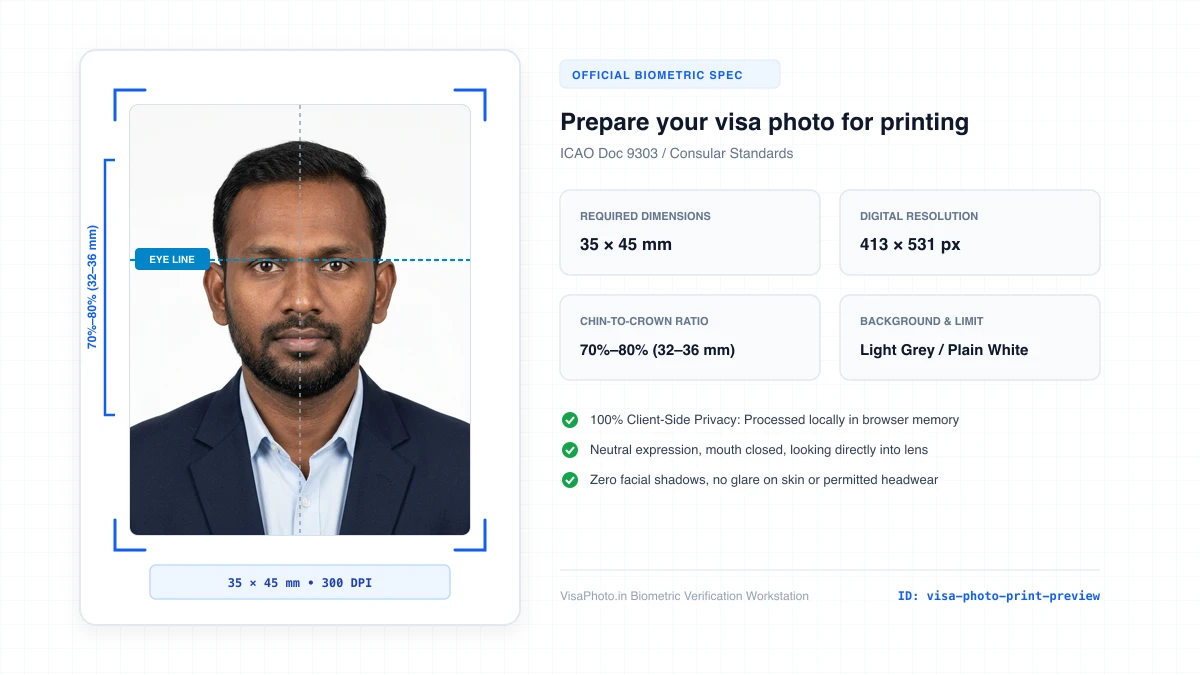
Print sheet layout showing passport photos arranged with crop marks on 4x6 inch paper
Realistic print-sheet preview on photo paper
Official Government Authority Sources
All requirement specifications are sourced directly from official gazettes and immigration portals.
What Prepare your visa photo for printing. Can and Cannot Verify
हमारी तकनीकी गारंटी और निष्पक्ष पारदर्शिता
VisaPhoto.in maintains complete transparency. We ensure your photograph matches published mathematical and optical specifications, but we never make false claims of consular authority.
- ✓Exact Dimensions: सटीक साइज (mm, इंच) और 300 DPI रेजोल्यूशन।
- ✓Target File Limit: 240 KB या 300 KB के अंदर सुरक्षित कंप्रेशन।
- ✓Biometric Ratios: चेहरे (70%–80%) और आंखों की बिल्कुल सही सीध।
- ✓Background Uniformity: बैकग्राउंड का सही रंग (सफेद या हल्का ग्रे)।
- !Visa Approvals: वीजा अप्रूवल का अंतिम निर्णय दूतावास के हाथ में होता है।
- !Photo Recency: फोटो 6 महीने से ज्यादा पुरानी नहीं होनी चाहिए।
- !Physical Identity: फोटो में आवेदक की असली पहचान स्पष्ट होनी चाहिए।
Frequently Asked Questions
अक्सर पूछे जाने वाले सवाल व आधिकारिक जवाब
Related Biometric Tools & Compliance Guides
अन्य उपयोगी वीजा टूल्स व देश गाइड