How VisaPhoto.in Works
How VisaPhoto.in Works — सरकारी दूतावास नियमों के अनुसार फोटो बनाएं, रिजेक्शन चेक करें और 300 DPI में डाउनलोड करें।
Learn how VisaPhoto.in works. From selecting your target sovereign visa category to uploading a phone portrait, running automated biometric verification, and exporting portal-ready files, explore our 5-step client-side workflow. [हिन्दी दिशा-निर्देश]: How VisaPhoto.in Works के लिए आधिकारिक मानकों के अनुरूप फोटो फ्रेमिंग करें, चेहरे के अनुपात की पुष्टि करें और उच्च रेजोल्यूशन में सीधे डाउनलोड करें।
How VisaPhoto.in Works
From your smartphone camera to an official embassy-ready portrait in under 60 seconds. Learn how our browser engine processes your photo with 100% privacy.
Choose Destination & Visa Type
Select your target country and specific application form (e.g., US DS-160, Schengen Type C, India e-Visa, UK Visitor). Our database loads the official statutory requirements.
Snap with Phone or Upload Portrait
Take a clear portrait against a plain wall from 5–6 feet away or choose an existing photo from your camera roll or desktop.
Automated Biometric Checks
Our engine measures chin-to-crown height, horizontal eye alignment, background uniformity, aspect ratio, and file weight in kilobytes.
Fix & Align in Browser
If corrections are needed, use our tools to auto-crop to exact millimeters, remove background shadows, or compress to the portal KB limit.
Download Portal-Ready File
Download your high-resolution JPEG formatted for immediate digital portal upload or a 300 DPI 4×6 print sheet with cutting guides.
Ready to prepare your photo?
Start with our flagship automated Visa Photo Maker.
Top 5 Consular Photo Rules • दूतावास रिजेक्शन से बचने के 5 नियम
फोटो खिंचवाते समय चश्मा उतार दें; लेंस की चमक से बायोमेट्रिक स्कैनर फेल होता है।
मुंह पूरी तरह बंद रखें, दोनों होंठ मिले होने चाहिए और चेहरा न्यूट्रल (शांत) रखें।
दीवार से 1.5 मीटर आगे खड़े हों ताकि सिर या कानों के पीछे परछाई न पड़े।
किसी दूसरे व्यक्ति से आंखों की सीध में 1.5 से 2 मीटर दूरी से फोटो खिंचवाएं।
ठुड्डी से सिर तक का हिस्सा सरकारी पैमाने के अनुसार होना अनिवार्य है।
हमारा टूल फोटो को सही पिक्सेल और 300 DPI पर एक्सपोर्ट करता है।
Our 5-Step Product Workflow
फोटो तैयार करने के आसान कदम
- •1. Destination Selection: Pick from over 55 sovereign countries and application categories (e.g. US DS-160, Schengen, India e-Visa).
- •2. Photo Capture / Upload: Upload an existing portrait or snap a photo using your smartphone camera.
- •3. Biometric Verification: Our algorithms evaluate dimensions, 1:1 or 35:45 aspect ratio, chin-to-crown height, eye level, and background uniformity.
- •4. Interactive Correction: Use our tools to auto-crop, eliminate background shadows, or compress to target KB limits.
- •5. Instant Download: Export a digital JPEG for online portals or a 300 DPI 4×6 print sheet for in-person consular appointments.
Under the Hood: HTML5 Canvas & WebAssembly
जरूरी दिशा-निर्देश व जानकारी
VisaPhoto.in executes entirely within your browser using modern web APIs (HTML5 Canvas 2D context, WebAssembly, and Blob objects). Because no network round-trips to remote cloud servers are needed, processing is instantaneous and 100% private.
Client-Side Canvas Processing Pipeline Architecture
फोटो तैयार करने के आसान कदम
When you upload an image, our browser-native HTML5 Canvas engine detects facial bounds, adjusts contrast curves, crops to exact millimeter proportions, and rasterizes at 300 DPI—all within your device RAM without transmitting any image bytes over the internet.
Visual Biometric Composition & Schematics
बायोमेट्रिक फ्रेमिंग गाइड व तकनीकी निरीक्षण
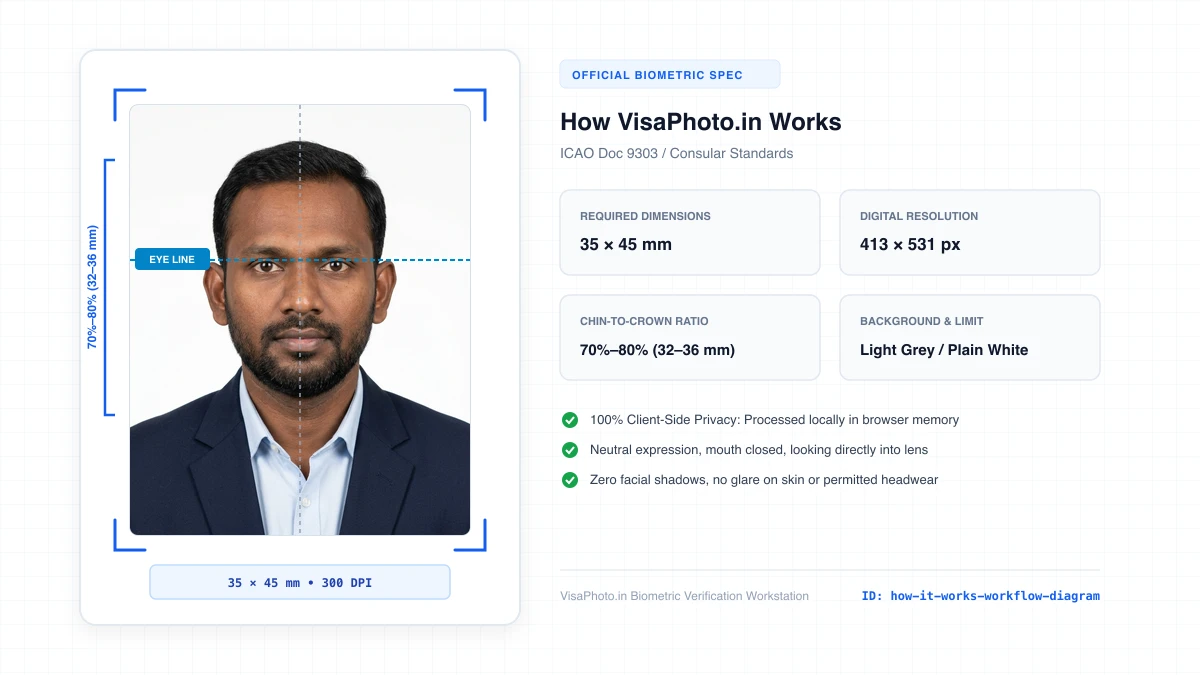
How VisaPhoto.in Works 5-Step Product Workflow
Visual 5-step diagram showing destination pick, upload, check, fix, and download
Official Government Authority Sources
All requirement specifications are sourced directly from official gazettes and immigration portals.
What How VisaPhoto.in Works Can and Cannot Verify
हमारी तकनीकी गारंटी और निष्पक्ष पारदर्शिता
VisaPhoto.in maintains complete transparency. We ensure your photograph matches published mathematical and optical specifications, but we never make false claims of consular authority.
- ✓Exact Dimensions: सटीक साइज (mm, इंच) और 300 DPI रेजोल्यूशन।
- ✓Target File Limit: 240 KB या 300 KB के अंदर सुरक्षित कंप्रेशन।
- ✓Biometric Ratios: चेहरे (70%–80%) और आंखों की बिल्कुल सही सीध।
- ✓Background Uniformity: बैकग्राउंड का सही रंग (सफेद या हल्का ग्रे)।
- !Visa Approvals: वीजा अप्रूवल का अंतिम निर्णय दूतावास के हाथ में होता है।
- !Photo Recency: फोटो 6 महीने से ज्यादा पुरानी नहीं होनी चाहिए।
- !Physical Identity: फोटो में आवेदक की असली पहचान स्पष्ट होनी चाहिए।
Frequently Asked Questions
अक्सर पूछे जाने वाले सवाल व आधिकारिक जवाब
Related Biometric Tools & Compliance Guides
अन्य उपयोगी वीजा टूल्स व देश गाइड