
How VisaPhoto Processes Your Photo
How VisaPhoto Processes Your Photo — सरकारी दूतावास नियमों के अनुसार फोटो बनाएं, रिजेक्शन चेक करें और 300 DPI में डाउनलोड करें।
Detailed technical overview of the VisaPhoto.in browser image processing pipeline. Learn how HTML5 Canvas, WebAssembly, and local Blob synthesis execute on your device to crop, resize, compress, and validate biometric photographs without ever transmitting image data to remote servers. [हिन्दी दिशा-निर्देश]: How VisaPhoto Processes Your Photo के लिए आधिकारिक मानकों के अनुरूप फोटो फ्रेमिंग करें, चेहरे के अनुपात की पुष्टि करें और उच्च रेजोल्यूशन में सीधे डाउनलोड करें।
How VisaPhoto Processes Your Photo
An in-depth technical explanation of our browser-based image processing pipeline, privacy guarantees, and mathematical scaling algorithms.
The 5-Stage Client-Side Pipeline
1. In-Memory Image Ingestion
When you select or snap a photo, your browser reads the raw file bytes into a local JavaScript FileReader / ImageBitmap object in device RAM. No HTTP POST request or network payload is dispatched.
2. High-Precision Coordinate Cropping
Our engine computes biometric bounding boxes (chin-to-crown span, eye horizontal line) and extracts the region using HTML5 2D Canvas context rendering with sub-pixel precision.
3. Bicubic Resampling & DPI Header Embedding
The cropped canvas is resampled to exact millimeter or pixel dimensions. For print sheets, EXIF/JFIF metadata headers are written to designate 300 DPI physical output density.
4. Local JPEG Compression & Quantization
Canvas toBlob() converts the pixel matrix into a JPEG stream with calibrated quality parameters, ensuring file weight stays strictly below the 240 KB or 300 KB embassy portal limits without blurring facial features.
5. Instant Local Blob Synthesis
The final JPEG is packaged into a local Blob URL (blob:https://visaphoto.in/...) and triggered for browser download. The memory is released as soon as the session concludes.
Top 5 Consular Photo Rules • दूतावास रिजेक्शन से बचने के 5 नियम
फोटो खिंचवाते समय चश्मा उतार दें; लेंस की चमक से बायोमेट्रिक स्कैनर फेल होता है।
मुंह पूरी तरह बंद रखें, दोनों होंठ मिले होने चाहिए और चेहरा न्यूट्रल (शांत) रखें।
दीवार से 1.5 मीटर आगे खड़े हों ताकि सिर या कानों के पीछे परछाई न पड़े।
किसी दूसरे व्यक्ति से आंखों की सीध में 1.5 से 2 मीटर दूरी से फोटो खिंचवाएं।
ठुड्डी से सिर तक का हिस्सा सरकारी पैमाने के अनुसार होना अनिवार्य है।
हमारा टूल फोटो को सही पिक्सेल और 300 DPI पर एक्सपोर्ट करता है।
The 5-Stage Local Execution Pipeline
जरूरी दिशा-निर्देश व जानकारी
- •1. Client-Side Ingestion: Image bytes are read into local browser RAM using FileReader and ImageBitmap APIs without initiating any network requests.
- •2. Sub-Pixel Cropping: The engine computes biometric bounding boxes (chin-to-crown height, eye level) and extracts the region using Canvas 2D context rendering.
- •3. Bicubic Resampling: The cropped matrix is resampled to exact millimeter or pixel specifications with sharp edge definition.
- •4. JPEG Quantization: The canvas is encoded into a JPEG byte stream using calibrated compression matrices to ensure file size stays strictly below portal KB limits.
- •5. Blob Download: The file is wrapped in an ephemeral local Blob URL (blob:https://...) and saved directly to your device.
Zero Remote Upload Guarantee
जरूरी दिशा-निर्देश व जानकारी
We explicitly state that at no point during processing does your photograph travel across the internet to our servers or any third-party cloud infrastructure. All computing resources used are those of your own personal device.
In-Memory Canvas Manipulation and Color Fidelity
जरूरी दिशा-निर्देश व जानकारी
By leveraging WebAssembly and hardware-accelerated Canvas 2D contexts, our image pipeline applies bicubic resampling and color gamut mapping in milliseconds, delivering studio-grade sharpness without compression artifacts.
Visual Biometric Composition & Schematics
बायोमेट्रिक फ्रेमिंग गाइड व तकनीकी निरीक्षण
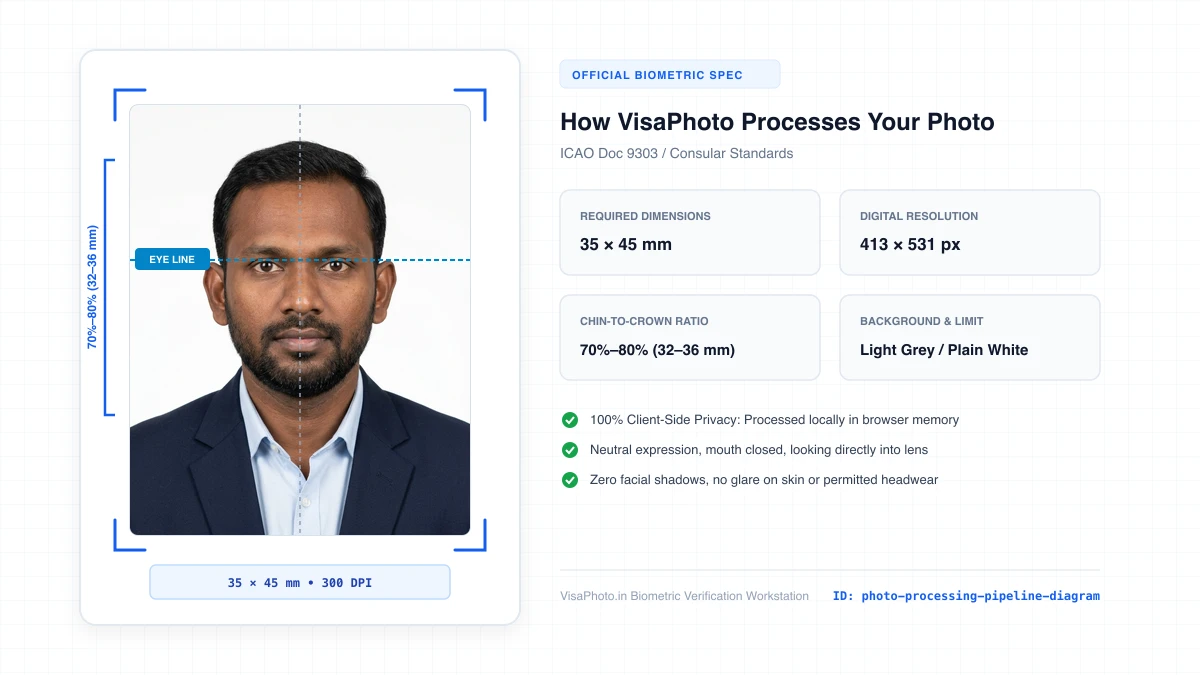
Client-Side Photo Processing Pipeline Flowchart
Technical flowchart showing client-side image processing steps
Official Government Authority Sources
All requirement specifications are sourced directly from official gazettes and immigration portals.
What How VisaPhoto Processes Your Photo Can and Cannot Verify
हमारी तकनीकी गारंटी और निष्पक्ष पारदर्शिता
VisaPhoto.in maintains complete transparency. We ensure your photograph matches published mathematical and optical specifications, but we never make false claims of consular authority.
- ✓Exact Dimensions: सटीक साइज (mm, इंच) और 300 DPI रेजोल्यूशन।
- ✓Target File Limit: 240 KB या 300 KB के अंदर सुरक्षित कंप्रेशन।
- ✓Biometric Ratios: चेहरे (70%–80%) और आंखों की बिल्कुल सही सीध।
- ✓Background Uniformity: बैकग्राउंड का सही रंग (सफेद या हल्का ग्रे)।
- !Visa Approvals: वीजा अप्रूवल का अंतिम निर्णय दूतावास के हाथ में होता है।
- !Photo Recency: फोटो 6 महीने से ज्यादा पुरानी नहीं होनी चाहिए।
- !Physical Identity: फोटो में आवेदक की असली पहचान स्पष्ट होनी चाहिए।
Frequently Asked Questions
अक्सर पूछे जाने वाले सवाल व आधिकारिक जवाब
Related Biometric Tools & Compliance Guides
अन्य उपयोगी वीजा टूल्स व देश गाइड