
Digital vs. Printed Visa Photos: What’s the Difference?
4×6 इंच फोटो पेपर या A4 शीट पर कई पासपोर्ट साइज फोटो एक साथ प्रिंट करने के लिए ग्रिड बनाएं।
Comprehensive conceptual guide comparing digital visa photos for online portal uploads with physical printed photographs for consular appointments. Understand how pixel dimensions, DPI, file weight in kilobytes, and photographic paper requirements differ across immigration workflows. [हिन्दी दिशा-निर्देश]: Digital vs. Printed Visa Photos: What’s the Difference? के लिए उच्च-गुणवत्ता वाली प्रिंटेबल फोटो शीट तैयार करें और 100% स्केल पर बिना किसी विकृति के प्रिंट निकालें।
Digital vs Printed Visa Photos: Key Differences Explained
Understand pixel dimensions, DPI, file compression, and physical photo paper rules.
Step 1: Digital Visa Photos (Online Upload)
Common specs include US DS-160 (600×600 px, max 240 KB), India e-Visa (350×350 to 1000×1000 px, max 300 KB), and Canada IRCC (min 420×540 px, max 4 MB).
Maintain exact aspect ratio and keep file weight within the portal’s KB limit.
Do not upload low-resolution web thumbnails (under 300×300 px).
Ready to Create or Check Your Photo?
Apply these guidelines immediately using our automated client-side processing tool.
Top 5 Consular Photo Rules • दूतावास रिजेक्शन से बचने के 5 नियम
फोटो खिंचवाते समय चश्मा उतार दें; लेंस की चमक से बायोमेट्रिक स्कैनर फेल होता है।
मुंह पूरी तरह बंद रखें, दोनों होंठ मिले होने चाहिए और चेहरा न्यूट्रल (शांत) रखें।
दीवार से 1.5 मीटर आगे खड़े हों ताकि सिर या कानों के पीछे परछाई न पड़े।
किसी दूसरे व्यक्ति से आंखों की सीध में 1.5 से 2 मीटर दूरी से फोटो खिंचवाएं।
ठुड्डी से सिर तक का हिस्सा सरकारी पैमाने के अनुसार होना अनिवार्य है।
हमारा टूल फोटो को सही पिक्सेल और 300 DPI पर एक्सपोर्ट करता है।
Digital Visa Photos (Online Electronic Portals)
जरूरी दिशा-निर्देश व जानकारी
- •Measurement Unit: Digital photos are measured in pixels (px) and kilobytes (KB).
- •Use Cases: Electronic visa applications (e-Visas), online portal forms (e.g., US DS-160, Australia ImmiAccount, Singapore SGAC).
- •Key Constraints: File weight caps (e.g., max 240 KB for US, max 300 KB for India), exact aspect ratio (1:1 square or 35:45), and RGB color encoding.
- •Common Rejection: Uploading high-megabyte files straight from smartphones or low-resolution web thumbnails.
Printed Visa Photos (In-Person Consular & VAC Submission)
जरूरी दिशा-निर्देश व जानकारी
- •Measurement Unit: Printed photos are measured in physical millimetres (mm) or inches (in).
- •Use Cases: In-person embassy interviews, VAC biometric capture centers (VFS Global, BLS International, TLScontact), and physical passport renewals.
- •Key Constraints: Must be printed on continuous-tone photographic paper at minimum 300 DPI at 100% scale (no "fit to page"), with clean straight edges.
- •Common Rejection: Printing on standard office copy paper or using low-DPI printers that cause visible dot patterns.
sRGB Color Space vs. Continuous-Tone Photographic Output
जरूरी दिशा-निर्देश व जानकारी
Digital visa uploads require the sRGB color profile to display correctly on consular workstations. Physical prints must be rendered on continuous-tone photo paper (glossy or semi-matte) using dye-sublimation or chemical silver halide printing to prevent halftone dot patterns.
Visual Biometric Composition & Schematics
बायोमेट्रिक फ्रेमिंग गाइड व तकनीकी निरीक्षण
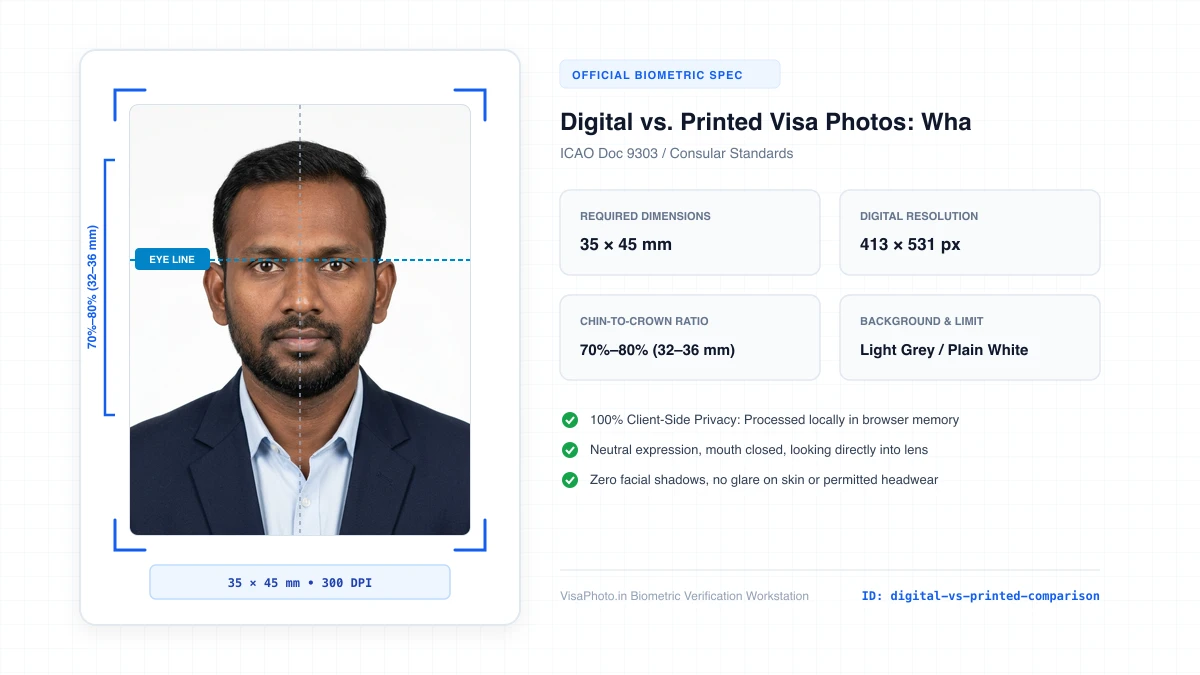
Digital vs Printed Visa Photo Comparison
Visual comparison between digital screen upload and physical printed photo on paper
Official Government Authority Sources
All requirement specifications are sourced directly from official gazettes and immigration portals.
What Digital vs. Printed Visa Photos: What’s the Difference? Can and Cannot Verify
हमारी तकनीकी गारंटी और निष्पक्ष पारदर्शिता
VisaPhoto.in maintains complete transparency. We ensure your photograph matches published mathematical and optical specifications, but we never make false claims of consular authority.
- ✓Exact Dimensions: सटीक साइज (mm, इंच) और 300 DPI रेजोल्यूशन।
- ✓Target File Limit: 240 KB या 300 KB के अंदर सुरक्षित कंप्रेशन।
- ✓Biometric Ratios: चेहरे (70%–80%) और आंखों की बिल्कुल सही सीध।
- ✓Background Uniformity: बैकग्राउंड का सही रंग (सफेद या हल्का ग्रे)।
- !Visa Approvals: वीजा अप्रूवल का अंतिम निर्णय दूतावास के हाथ में होता है।
- !Photo Recency: फोटो 6 महीने से ज्यादा पुरानी नहीं होनी चाहिए।
- !Physical Identity: फोटो में आवेदक की असली पहचान स्पष्ट होनी चाहिए।
Frequently Asked Questions
अक्सर पूछे जाने वाले सवाल व आधिकारिक जवाब
Related Biometric Tools & Compliance Guides
अन्य उपयोगी वीजा टूल्स व देश गाइड