
VisaPhoto.in Accessibility Statement
VisaPhoto.in Accessibility Statement — सरकारी दूतावास नियमों के अनुसार फोटो बनाएं, रिजेक्शन चेक करें और 300 DPI में डाउनलोड करें।
VisaPhoto.in is dedicated to ensuring digital accessibility for all users, including individuals with disabilities. We continually refine our user interface to conform with WCAG 2.1 Level AA standards. सुलभता कथन — सभी उपयोगकर्ताओं, दिव्यांगजनों और स्क्रीन रीडर उपयोगकर्ताओं के लिए एक समावेशी व सुगम डिजिटल अनुभव।
Accessibility Statement
VisaPhoto.in is dedicated to ensuring digital accessibility for all users, including individuals with visual, motor, auditory, or cognitive disabilities.
Semantic HTML & Heading Hierarchy
Pages follow a strict single <h1> structure followed by sequential <h2> and <h3> subheadings. Landmark elements (<header>, <main>, <nav>, <section>, <footer>) enable rapid screen reader navigation.
Keyboard Operability
All interactive tools, buttons, file uploaders, and modal dialogues are fully operable via standard keyboard commands (Tab, Enter, Space, Escape, Arrow keys) with high-contrast focus rings.
WCAG 2.1 AA Color Contrast
All body text (#111111, #555555) and interactive blue buttons (#155EEF) exceed the minimum 4.5:1 contrast ratio against white backgrounds, ensuring readability for users with low vision or color vision deficiencies.
Touch Targets & Mobile Usability
All buttons, links, and selectable items meet or exceed Apple and Google recommendations for minimum 44×44 pixel touch target dimensions.
Screen Reader Friendly Image Descriptions
Instructional diagrams and measurement guides provide meaningful alt text describing biometric concepts rather than generic decorative labels.
Encountering an Accessibility Barrier?
Please let us know so our accessibility team can remediate the issue promptly.
Top 5 Consular Photo Rules • दूतावास रिजेक्शन से बचने के 5 नियम
फोटो खिंचवाते समय चश्मा उतार दें; लेंस की चमक से बायोमेट्रिक स्कैनर फेल होता है।
मुंह पूरी तरह बंद रखें, दोनों होंठ मिले होने चाहिए और चेहरा न्यूट्रल (शांत) रखें।
दीवार से 1.5 मीटर आगे खड़े हों ताकि सिर या कानों के पीछे परछाई न पड़े।
किसी दूसरे व्यक्ति से आंखों की सीध में 1.5 से 2 मीटर दूरी से फोटो खिंचवाएं।
ठुड्डी से सिर तक का हिस्सा सरकारी पैमाने के अनुसार होना अनिवार्य है।
हमारा टूल फोटो को सही पिक्सेल और 300 DPI पर एक्सपोर्ट करता है।
1. Commitment to Inclusive Digital Design (WCAG 2.1 AA)
जरूरी दिशा-निर्देश व जानकारी
VisaPhoto.in believes that essential biometric compliance tools must be usable by everyone, including individuals with visual, auditory, motor, or cognitive disabilities. Our digital platform is developed and maintained in strict alignment with the Web Content Accessibility Guidelines (WCAG) 2.1 Level AA conformance criteria, ensuring universal accessibility across all modern web browsers.
2. Assistive Technology, Screen Readers, & Semantic Structure
जरूरी दिशा-निर्देश व जानकारी
Our interface is engineered with semantic HTML5 elements, explicit ARIA role designations, live regions for dynamic canvas feedback, and descriptive alternative text for all diagrammatic graphics. Users operating popular screen readers—including NVDA, JAWS, VoiceOver on iOS/macOS, and TalkBack on Android—receive clear contextual announcements during photo cropping, scaling, and validation.
3. Full Keyboard Operability, Focus Traps, & Contrast
जरूरी दिशा-निर्देश व जानकारी
All interactive components—including navigation links, modal dialogs, country selector chips, and download buttons—are completely navigable via standard keyboard controls (Tab, Shift+Tab, Enter, Space). We maintain minimum contrast ratios of 4.5:1 for body copy and 3:1 for large UI components, complete with prominent visual focus indicators.
4. Continuous Auditing, Feedback, & Contact Channels
जरूरी दिशा-निर्देश व जानकारी
We perform automated and manual accessibility audits during every development sprint. If you experience difficulty accessing any part of our site or using our photo verification workstation, please email accessibility@visaphoto.in with details of your setup; our engineering team will address your report promptly.
Visual Biometric Composition & Schematics
बायोमेट्रिक फ्रेमिंग गाइड व तकनीकी निरीक्षण
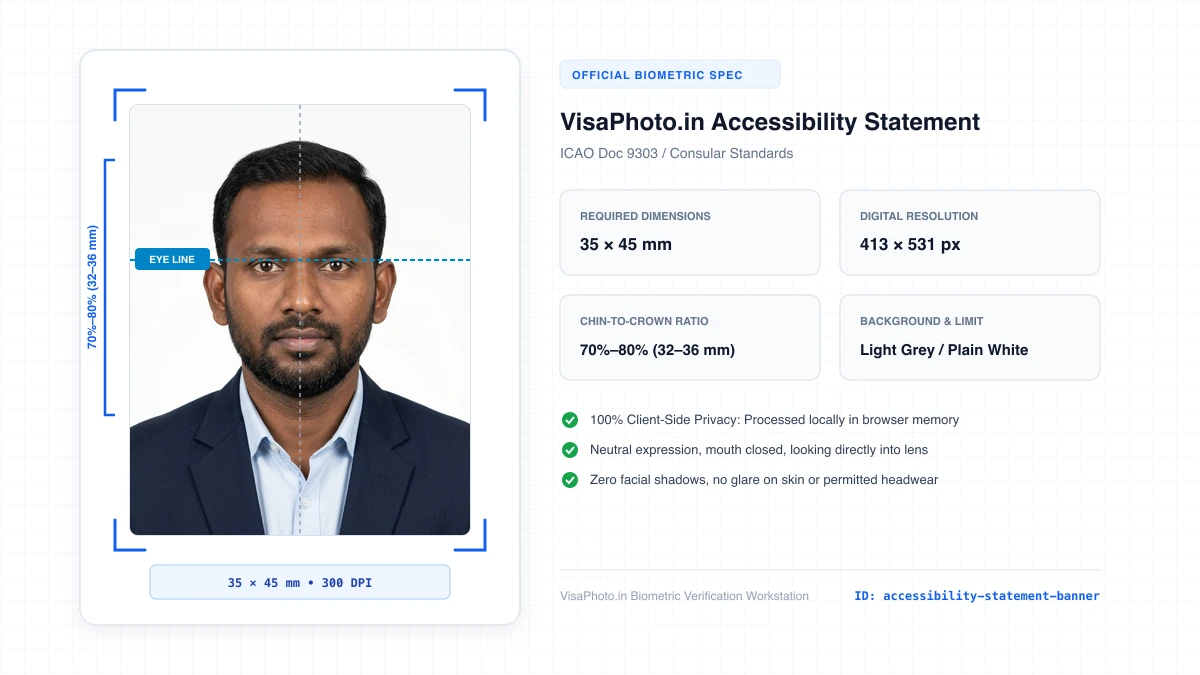
VisaPhoto.in Accessibility Statement
Digital accessibility and WCAG compliance banner
Official Government Authority Sources
All requirement specifications are sourced directly from official gazettes and immigration portals.
What VisaPhoto.in Accessibility Statement Can and Cannot Verify
हमारी तकनीकी गारंटी और निष्पक्ष पारदर्शिता
VisaPhoto.in maintains complete transparency. We ensure your photograph matches published mathematical and optical specifications, but we never make false claims of consular authority.
- ✓Exact Dimensions: सटीक साइज (mm, इंच) और 300 DPI रेजोल्यूशन।
- ✓Target File Limit: 240 KB या 300 KB के अंदर सुरक्षित कंप्रेशन।
- ✓Biometric Ratios: चेहरे (70%–80%) और आंखों की बिल्कुल सही सीध।
- ✓Background Uniformity: बैकग्राउंड का सही रंग (सफेद या हल्का ग्रे)।
- !Visa Approvals: वीजा अप्रूवल का अंतिम निर्णय दूतावास के हाथ में होता है।
- !Photo Recency: फोटो 6 महीने से ज्यादा पुरानी नहीं होनी चाहिए।
- !Physical Identity: फोटो में आवेदक की असली पहचान स्पष्ट होनी चाहिए।
Frequently Asked Questions
अक्सर पूछे जाने वाले सवाल व आधिकारिक जवाब
Related Biometric Tools & Compliance Guides
अन्य उपयोगी वीजा टूल्स व देश गाइड